Installation Errors: The Hidden Threat to Linear Guide Service Life

The Hidden Threat to Linear Guide Service Life

Installation Errors: The Hidden Threat to Linear Guide Service Life

Table of Contents

As a professional mechanical assembly engineer, I have witnessed countless cases where linear guides—critical components ensuring precision motion in industrial equipment—fail prematurely not due to poor product quality, but improper installation. Linear guides and bearings rely on ultra-precise contact between rolling elements (balls or rollers) and raceways to deliver low friction, high rigidity, and long service life. Even micron-level installation errors can disrupt this balance, triggering a chain reaction of mechanical stress, wear, and ultimately, catastrophic failure. Below, I will break down how common installation errors degrade guide life, supported by engineering principles and on-site experience.

Installation Error Type
Key Impacts on Linear Guide Life
Mitigation Methods
Base Surface Flatness Error
 
Local overloading, contact fatigue cracks, increased sliding friction, adhesive wear
Check flatness with straightedge/feeler gauge; grind/mill base to correct errors if needed
Parallelism Error (Dual-Rail)
Carriage skewing, edge loading, scuffing, cage damage, inconsistent motion accuracy
Use laser interferometer for measurement; adjust with shims (0.005-0.05mm) to correct
Improper Bolt Tightening
Over-tightening: rail deformation, accelerated fatigue; Under-tightening: micro-movement, impact loads, cage breakage
Use calibrated torque wrench; follow manufacturer’s specs and cross-tightening sequence
Contamination During Installation
Abrasive wear, raceway scratches, lubricant degradation
Clean surfaces with industrial alcohol; use lint-free cloths; avoid bare hand contact with raceway

The Core Principle: Why Installation Precision Determines Guide Life

Linear guide manufacturers design their products based on the “ideal contact condition”: the raceway surface maintains uniform load distribution, and rolling elements move without sliding or skewing. Under this condition, the guide operates within its rated dynamic load (C) and static load (C₀), achieving the projected service life (L₁₀ = (C/P)³ × 10⁶ revolutions, per ISO standards).
Installation errors this ideal state by introducing uneven stress, abnormal friction, and micro-impacts. These issues do not manifest immediately; instead, they accumulate over cycles, accelerating material fatigue and wear. For example, a 0.1mm parallelism error can increase local contact stress by 30%—cutting the guide’s service life by half or more, according to our team’s field test data.

Common Installation Errors and Their Impact on Guide Life

Base Surface Flatness Error

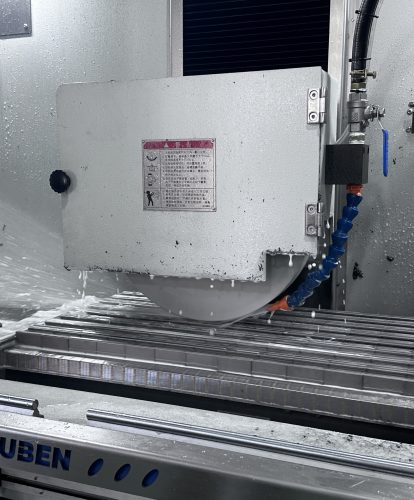
The base (e.g., machine tool bed, linear module frame) is the foundation of guide installation. If the base surface has unevenness (e.g., warping, indentations) exceeding the guide’s tolerance (typically 0.02-0.05mm/m for precision guides), two critical issues arise:
  • Local Overloading: When tightening the guide’s mounting bolts, the uneven base forces the guide’s rail to deform. This creates “high-stress points” where the rolling elements bear excessive load—far beyond the design limit. Over time, these points develop contact fatigue cracks (visible as small pits on the raceway), which spread and cause the guide to seize.
  • Increased Friction: Deformed rails force rolling elements to slide (rather than roll) against the raceway, generating sliding friction (up to 10x higher than rolling friction). This not only raises operating temperature (accelerating lubricant degradation) but also causes adhesive wear (metal transfer between rolling elements and raceways), a leading cause of premature guide failure.
Case Example: A CNC router we serviced experienced guide jamming after 6 months (instead of the expected 5 years). Inspection revealed the base had a 0.2mm/m flatness error; the guide rail had developed a 0.15mm bend, and the raceway showed severe adhesive wear.

Parallelism Error Between Two Rails (Dual-Rail Systems)

Most heavy-load or high-precision applications use dual rails (e.g., gantry machines, robotic arms). Parallelism errors (i.e., the two rails are not aligned along the motion axis) cause three deadly problems:
  • Skewing of the Carriage: The carriage (which connects the two rails) is forced to tilt, making the rolling elements contact the raceway edges instead of the center. This edge loading concentrates stress on the rail’s shoulders, leading to rapid wear and even chipping of the raceway.
  • Torque on Rolling Elements: Skewing introduces a rotational torque on the carriage, causing rolling elements to spin at an angle. This creates scuffing (long, shallow scratches on the raceway) and increases the risk of cage damage (the component that separates rolling elements). Once the cage breaks, rolling elements collide with each other, destroying the guide in hours.
  • Inconsistent Motion Accuracy: Even if the guide does not fail immediately, parallelism errors lead to “stick-slip” motion, which damages the workpiece (e.g., uneven cutting in machining) and puts additional stress on the guide over time.
Engineering Tip: For dual-rail systems, use a laser interferometer to measure parallelism; the error should not exceed 0.01mm/m for precision applications.

Improper Bolt Tightening (Over-Tightening or Under-Tightening)

Mounting bolts are not just “fasteners”—they ensure the guide rail is firmly fixed to the base without deformation. Both over-tightening and under-tightening are equally damaging:
  • Over-Tightening: Excessive torque (beyond the manufacturer’s specification, e.g., 12 N·m for M6 bolts) causes the rail to compress and deform along the bolt axis. This creates a “wave-like” distortion in the raceway, where rolling elements encounter periodic high-stress zones. Our tests show that over-tightening by 20% reduces guide life by 40% due to accelerated fatigue.
  • Under-Tightening: Loose bolts allow the rail to shift slightly during operation. This micro-movement between the rail and base generates impact loads (especially during rapid acceleration/deceleration), which crack the raceway and loosen the rolling element cages. In one case, a conveyor system’s guide failed after 3 months because bolts were tightened to only 50% of the recommended torque—resulting in rail displacement and cage breakage.
Best Practice: Use a torque wrench calibrated to the manufacturer’s specs (e.g., THK, HIWIN provide detailed torque tables) and follow the “cross-tightening sequence” to ensure uniform pressure.

Contamination During Installation

While not a “dimensional error,” contamination (e.g., dust, metal shavings, oil residues) during installation is a silent killer of guide life. Here’s why:
  • Abrasive Wear: Dust particles or metal chips trapped between the rolling elements and raceway act as abrasives, scratching the raceway surface. These scratches deepen with each cycle, reducing the guide’s load-bearing capacity and creating stress concentrations that lead to cracks.
  • Lubricant Degradation: Contaminants mix with the initial lubricant (applied during installation), turning it into a “grinding paste” that accelerates wear. Even a small amount of metal shavings can reduce lubricant effectiveness by 60% within a month.
On-Site Protocol: Always clean the base surface, guide rail, and bolts with industrial-grade alcohol before installation. Use lint-free cloths and avoid touching the raceway with bare hands (skin oil causes lubricant breakdown).

How to Mitigate Installation Errors and Extend Guide Life

As assembly engineers, our goal is to eliminate errors at the source. Here’s a step-by-step workflow we use in our projects:
  1. Pre-Installation Inspection:
    • Check the base surface flatness with a straightedge and feeler gauge (or a surface roughness tester for high-precision applications). If the error exceeds specs, grind or mill the base to correct it.
    • Verify the guide rail’s condition: inspect for scratches, dents, or rust (common in storage). If damaged, replace the rail immediately (even small dents cause stress concentrations).
  2. Precision Alignment:
    • For single-rail systems: Use a dial indicator to align the rail with the motion axis (runout tolerance ≤ 0.01mm/m).
    • For dual-rail systems: Use a laser interferometer to measure parallelism, pitch, and yaw. Adjust shims (thin metal sheets) under the rail to correct errors (shim thickness should be 0.005-0.05mm for fine tuning).
  3. Controlled Bolt Tightening:
    • Follow the manufacturer’s torque specifications exactly. Use a torque wrench with a calibration certificate (calibrate every 6 months to ensure accuracy).
    • Tighten bolts in a cross pattern (e.g., for a 4-bolt rail: 1 → 3 → 2 → 4) to distribute pressure evenly. Wait 10 minutes after initial tightening, then retighten to eliminate “settling” of the rail.
  4. Post-Installation Testing:
    • Manually move the carriage along the rail: it should move smoothly without resistance or clicking sounds (clicking indicates edge loading or cage damage).
    • Use a dial indicator to measure carriage runout (vertical and horizontal runout ≤ 0.005mm for precision guides).
    • Apply the correct lubricant (grease for low-speed, oil for high-speed applications) and wipe off excess (too much lubricant traps contaminants).

Conclusion

Linear guide life is not determined by the product alone—it is a direct result of installation quality. As mechanical assembly engineers, we hold the key to maximizing guide performance: by eliminating flatness, parallelism, and bolt-tightening errors, and preventing contamination, we can ensure guides operate within their design limits, achieving or even exceeding their projected service life.
The cost of correcting installation errors is trivial compared to the cost of unplanned downtime (e.g., a CNC machine outage costs $500-$2,000 per hour). By investing time in precision alignment, controlled tightening, and thorough inspection, we not only extend guide life but also improve the overall reliability and efficiency of the equipment we build.

Get Your Linear Guide STEP File

Leave your contact information to receive the STEP file and get professional technical support and product selection advice